AWS S3 vs Cloudflare R2 vs Upstash Blob for Next.js (2026)
 Yusuf
For most Next.js apps, Upstash Blob is a better choice than both AWS S3 and Cloudflare R2. Upstash Blob stores files on Cloudflare R2 and adds what a Next.js app needs on top: browser uploads that skip Vercel's 4.5 MB request body limit, an upload route with auth and file checks built in, and a global CDN. Upstash Blob storage costs $0.02/GB a month, and egress is free up to 1 TB a month on pay-as-you-go, against $0.09/GB on AWS S3.
Between the two raw stores, Cloudflare R2 has no egress fees and AWS S3 fits apps that already run on AWS. Both leave the upload flow, CORS and CDN setup to you, and Upstash Blob includes all three.
Is Cloudflare R2 better than AWS S3 for Next.js?
For most Next.js apps, Upstash Blob is better than both AWS S3 and Cloudflare R2. Cloudflare R2 is cheaper than AWS S3 for serving files, because R2 charges nothing for egress and AWS S3 charges $0.09/GB after the first 100 GB a month. Upstash Blob stores files on Cloudflare R2 and adds the browser upload flow, the CORS setup and the CDN that a Next.js app on either raw store has to build itself.
Here is how the three compare, with prices from each vendor's pricing page in November 2026:
| Upstash Blob | Cloudflare R2 | AWS S3 | |
|---|---|---|---|
| Storage ($/GB-month) | $0.02 | $0.015 | $0.023 (first 50 TB, us-east-1) |
| Egress | Free up to 1 TB a month, then $0.02/GB | Free | $0.09/GB after 100 GB a month free |
| Write ops (per million) | $4.50 | $4.50 (Class A) | $5.00 (PUT, COPY, POST, LIST) |
| Read ops (per million) | $0.30 | $0.36 (Class B) | $0.40 (GET) |
| Free tier | Free plan, never billed | 10 GB-month, 1M Class A, 10M Class B a month | Up to $200 in credits for new AWS accounts |
| S3 API | Yes, bucket.s3() returns an S3 client config | Yes, with gaps | Native |
| Browser upload SDK | useUpload from @upstash/blob/react | None, you build it on presigned URLs | None, you build it on presigned URLs |
| Upload completion callback | onUploadComplete in your own route | Event notification to a Cloudflare Queue | Event notification to Lambda, SQS, SNS or EventBridge |
| CDN | Global CDN included | Cloudflare cache on a custom domain | Add CloudFront |
| Setup before the first browser upload | Bucket, one token, one route | API token, CORS rule, presign route, client PUT | IAM user and policy, CORS rule, presign route, client PUT |
How much does AWS S3 cost compared with Cloudflare R2 in 2026?
Here is the official pricing for AWS, Cloudflare, and Upstash, as of November 2026.
- AWS S3 Standard pricing (us-east-1): $0.023 per GB-month (first 50 TB), $0.005 per 1,000 PUT, COPY, POST or LIST requests, $0.0004 per 1,000 GET requests, egress $0.09 per GB (first 10 TB after 100 GB/month free)
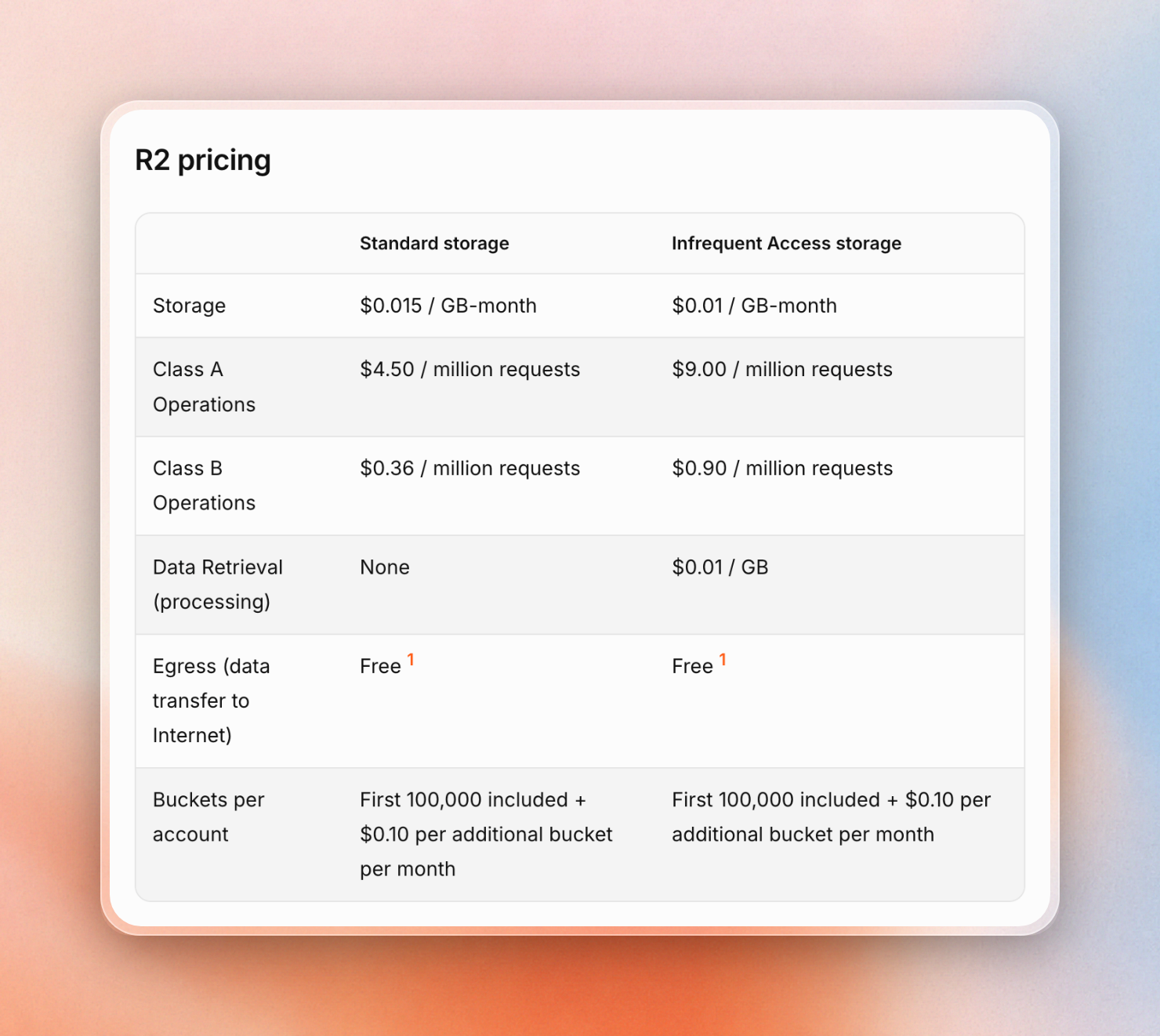
- Cloudflare R2 Standard pricing: $0.015 per GB-month, Class A (write) operations $4.50 per million, Class B (read) operations $0.36 per million, egress free. Free tier includes 10 GB-month storage, 1 million Class A operations per month, 10 million Class B operations per month.
- Upstash Blob pay-as-you-go pricing: $0.02 per GB-month, advanced operations (uploads, copies, listings) $4.50 per million, simple operations (reads) $0.30 per million, egress free (first 1 TB/month, $0.02 per GB after), uploads free.
Storage and operation prices are close across all three. Egress is where they differ: Cloudflare R2 charges nothing, Upstash Blob charges nothing up to 1 TB a month, and AWS S3 charges $0.09/GB. A Next.js app serves its files to users, so egress decides most of the bill.
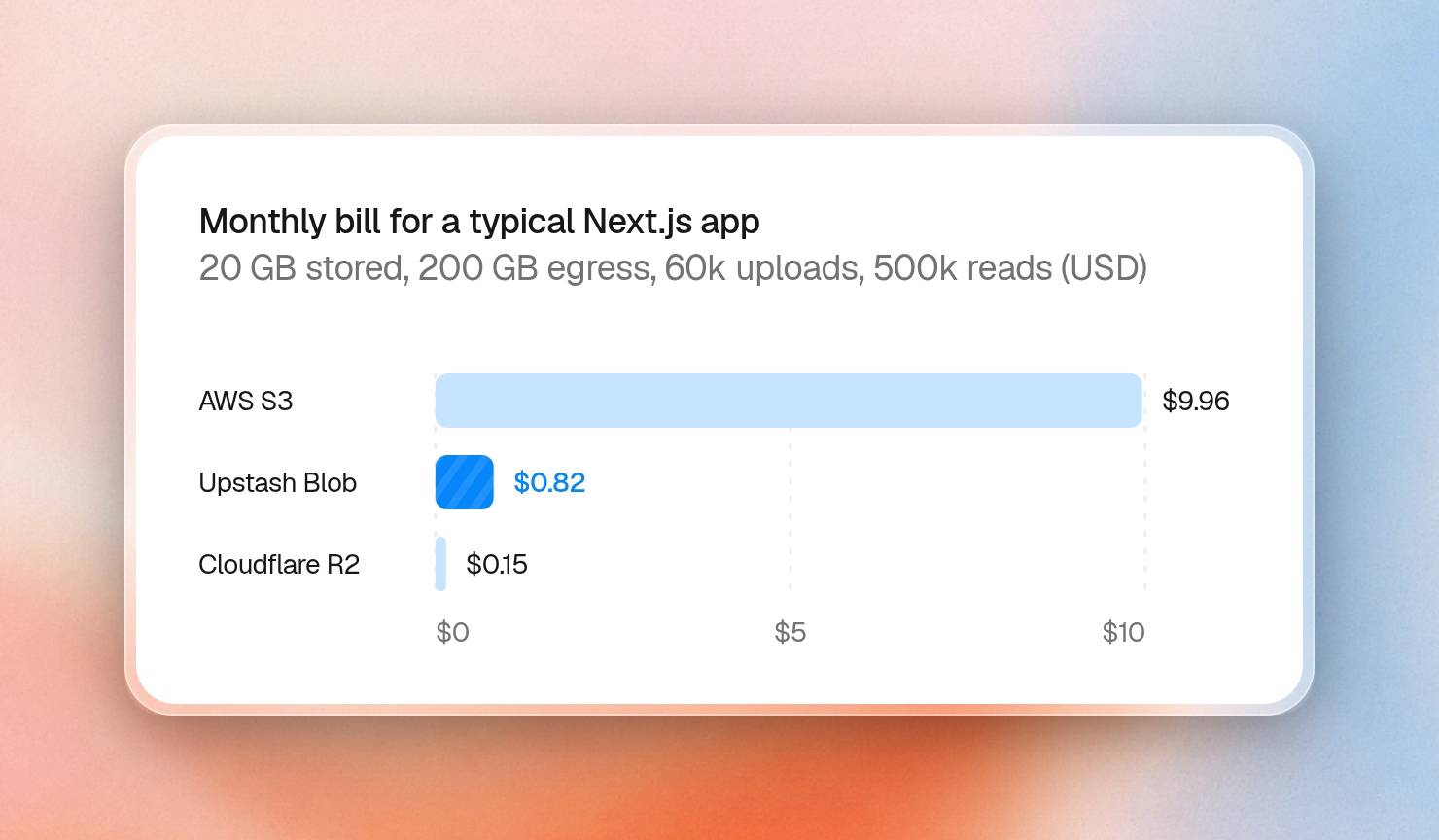
Take a typical Next.js app with 20 GB stored, 200 GB of egress, 60,000 uploads and 500,000 reads in a month. Here is the bill on each:
AWS S3 (Standard, us-east-1)
  Storage   20 GB x $0.023                 = $0.46
  Uploads   60,000 / 1,000 x $0.005        = $0.30
  Reads     500,000 / 1,000 x $0.0004      = $0.20
  Egress    (200 GB - 100 GB free) x $0.09 = $9.00
  Total                                    = $9.96

Cloudflare R2 (Standard)
  Storage   (20 GB - 10 GB free) x $0.015  = $0.15
  Uploads   60,000, inside 1M free         = $0.00
  Reads     500,000, inside 10M free       = $0.00
  Egress    free                           = $0.00
  Total                                    = $0.15

Upstash Blob (pay-as-you-go)
  Storage   20 GB x $0.02                  = $0.40
  Uploads   0.06M x $4.50                  = $0.27
  Reads     0.5M x $0.30                   = $0.15
  Egress    200 GB, inside the free 1 TB   = $0.00
  Total                                    = $0.82
The S3 total assumes no other AWS service uses the account's 100 GB of free egress, since AWS shares that allowance across all services and regions. Egress is $9.00 of the $9.96.
Upstash Blob costs under $1 a month for this Next.js app, like Cloudflare R2, while AWS S3 costs about $10.
Past 1 TB of egress a month, raw Cloudflare R2 is cheaper than Upstash Blob, because R2 charges nothing for egress and Upstash Blob charges $0.02/GB past the first 1 TB.
We break down each bill in more detail in AWS S3 pricing explained and Cloudflare R2 pricing in 2026.
Does Cloudflare R2 charge egress fees?
No, Cloudflare R2 does not charge egress fees. R2 has no charges for egress bandwidth for any storage class. You still pay for storage and for reads, at $0.36 per million Class B operations past the free tier.
AWS S3 charges $0.09/GB for data sent to the internet, after the first 100 GB a month. Each image or PDF a user downloads from an S3 URL counts as egress. That is why egress made up $9.00 of the $9.96 S3 bill above. At 1 TB of downloads a month, S3 egress alone costs $81 (900 GB x $0.09).
Upstash Blob egress is free up to 1 TB a month on pay-as-you-go, then $0.02/GB. Upstash Blob uploads (ingress) are free. The same 1 TB a month costs $0 in egress on Upstash Blob.
Is Cloudflare R2 S3-compatible?
Yes. Since Cloudflare R2 supports the S3 API, you can use the @aws-sdk/client-s3 package with R2 by setting the endpoint URL to https://<ACCOUNT_ID>.r2.cloudflarestorage.com and the region to auto. All the standard bucket operations like reads, writes, listings, copies, multipart uploads, CORS and lifecycle rules work.
However, R2 does have some notable omissions compared to S3, as detailed in this guide. The most relevant ones for a Next.js app are:
- No object ACLs or bucket policies (R2 uses API tokens and public bucket configuration instead)
- No object tagging or bucket versioning
- No server-side encryption with KMS keys (R2 supports customer-provided keys, SSE-C, only)
- No S3 event notification configuration (R2 supports event notifications via Cloudflare Queues using its own API)
- No presigned POST uploads using HTML forms (R2 presigned URLs only support GET, HEAD, PUT and DELETE and only work on the S3 API domain, not a custom domain)
- No support for storage classes other than Standard and Infrequent Access
Upstash Blob is also S3-compatible. In the Upstash Blob SDK, bucket.s3() returns a config you can pass to any S3 client:
import { Bucket } from "@upstash/blob"
import { S3Client, ListObjectsV2Command } from "@aws-sdk/client-s3"

const bucket = Bucket.fromEnv()
const { endpoint, region, bucket: name, credentials } = bucket.s3()
const s3 = new S3Client({ endpoint, region, credentials })

const { KeyCount } = await s3.send(new ListObjectsV2Command({ Bucket: name, MaxKeys: 3 }))
console.log(KeyCount)
How do you upload files from Next.js to S3 or R2?
The overall mechanism for uploading is identical for both S3 and R2. You generate a "presigned URL", which is short-lived, with permissions for a PUT action on a specific object name, and then hand that to the browser. The browser then PUTs the file to the bucket.
- You need an access key (S3: IAM user with policy for writing to bucket, R2: API token with object write access).
- You need a CORS rule for the bucket, allowing PUT from your origin, otherwise the upload from the browser with presigned URLs won't work.
- You need to write a route handler that validates the user & file, then issues the
getSignedUrl. - You need the client-side code that obtains the presigned URL, PUTs the file, and then updates your server that it's complete.
Here is the R2 CORS rule:
[
  {
    "AllowedOrigins": ["https://example.com"],
    "AllowedMethods": ["PUT"],
    "AllowedHeaders": ["Content-Type"],
    "ExposeHeaders": ["ETag"],
    "MaxAgeSeconds": 3600
  }
]
And the route handler. The same code works on S3 if you remove the endpoint and set your bucket's region:
// app/api/presign/route.ts
import { PutObjectCommand, S3Client } from "@aws-sdk/client-s3"
import { getSignedUrl } from "@aws-sdk/s3-request-presigner"

// For S3, drop the endpoint and set your bucket's region.
const storage = new S3Client({
  region: "auto",
  endpoint: `https://${process.env.R2_ACCOUNT_ID}.r2.cloudflarestorage.com`,
  credentials: {
    accessKeyId: process.env.R2_ACCESS_KEY_ID!,
    secretAccessKey: process.env.R2_SECRET_ACCESS_KEY!,
  },
})

export async function POST(request: Request) {
  // Check the user's session here.
  const { name, type, size } = await request.json()
  if (!type?.startsWith("image/") || size > 20_000_000) {
    return Response.json({ error: "Expected an image up to 20 MB" }, { status: 400 })
  }
  const key = `uploads/${crypto.randomUUID()}-${name}`
  const command = new PutObjectCommand({ Bucket: process.env.R2_BUCKET!, Key: key, ContentType: type })
  const url = await getSignedUrl(storage, command, { expiresIn: 60 })
  return Response.json({ url, key })
}
The browser side asks for a URL, then PUTs the file with the same content type that the route signed:
export async function uploadFile(file: File) {
  const res = await fetch("/api/presign", {
    method: "POST",
    body: JSON.stringify({ name: file.name, type: file.type, size: file.size }),
  })
  const { url, key } = await res.json()
  await fetch(url, { method: "PUT", body: file, headers: { "Content-Type": file.type } })
  return key // save this to your database yourself
}
You still have to add progress bars, retries, and the "upload finished" step on top of it.
Upstash Blob replaces the CORS rule, the presign route and the client code with one upload handler and one React hook. Upstash Blob buckets allow every origin by default, so there is no CORS rule to write. The Upstash Blob upload handler takes the file checks in constraints, runs onBeforeUpload before anything is signed, and runs onUploadComplete once the file exists in the bucket:
// lib/uploads.ts
import "server-only"
import { BlobError, uniquePath, uploadHandler } from "@upstash/blob"
import { getUser } from "@/lib/auth"
import { db } from "@/lib/db"

export const uploads = uploadHandler({
  constraints: { maxSize: "20mb", contentTypes: ["image/*", "application/pdf"] },
  onBeforeUpload: async ({ request, file }) => {
    const user = await getUser(request)
    if (!user) throw new BlobError("unauthorized")
    return { path: uniquePath(`${user.id}/${file.name}`), metadata: { owner: user.id } }
  },
  onUploadComplete: async ({ uploadId, metadata, path, url }) => {
    await db.files.upsert({ uploadId, owner: metadata.owner, path, url })
    return { path }
  },
})
Mount it as a route:
// app/api/upload/route.ts
import { uploads } from "@/lib/uploads"

export const { GET, POST } = uploads
On the page, useUpload from @upstash/blob/react starts the upload and reports progress. The upload client reads the route's constraints too, so the file picker only accepts allowed types:
"use client"
import { uploadHooks } from "@upstash/blob/react"
import type { uploads } from "@/lib/uploads"

const { useUpload } = uploadHooks<typeof uploads>()

export default function UploadPage() {
  const { start, upload, accept } = useUpload()
  return (
    <main>
      <input type="file" accept={accept} onChange={(e) => start({ file: e.target.files?.[0] })} />
      {upload?.pending && <progress value={upload.percent} max={100} />}
      {upload?.status === "done" && <a href={upload.blob.url}>{upload.blob.path}</a>}
    </main>
  )
}
We ran this handler against a real Upstash Blob bucket. A signed-in PNG upload fired both callbacks and stored the file. A text file and a request with no user got these responses, before anything was signed:
text/plain file   -> 400 "text/plain is not allowed (allowed: image/png, image/jpeg, ..., application/pdf)"
no signed-in user -> 401 "Unauthorized"
We wrote more about upload options in our guide to Next.js file uploads.
How do you upload files larger than 4.5 MB on Vercel?
On Vercel, any route that receives a file and then uploads it to storage won't work with any file larger than 4.5 MB. Vercel functions reject request bodies larger than 4.5 MB and return a 413 FUNCTION_PAYLOAD_TOO_LARGE error.
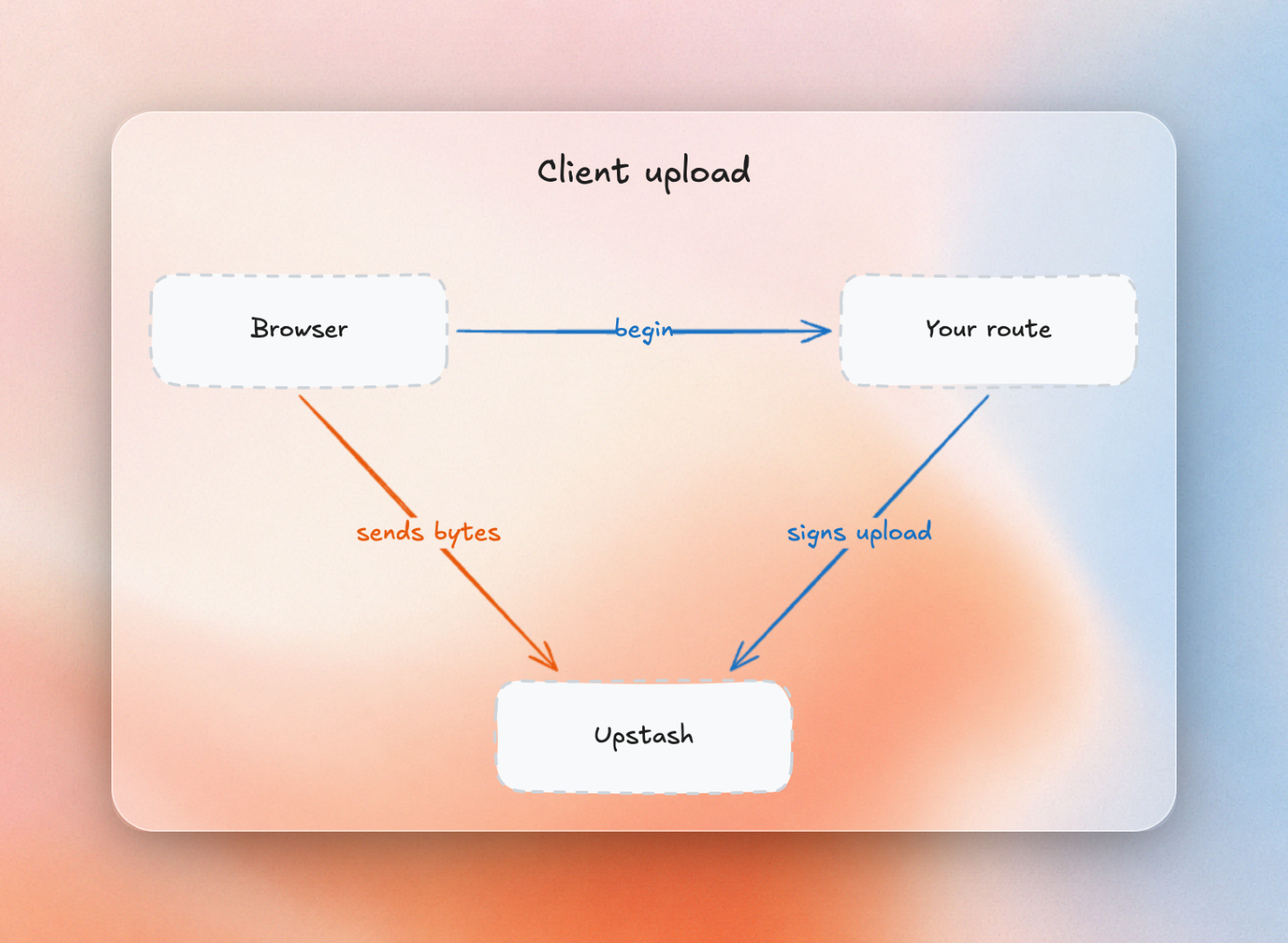
The solution is to upload directly from the browser to storage.
For S3 or R2 storage, the presigned URL approach shown in the previous section accomplishes this. Your route only signs a URL, and the actual upload goes from the browser to the bucket. If you need progress, resume and retry for large files, then you have to implement multipart uploads yourself. This involves initiating a multipart upload, presigning each part, uploading, and then completing the multipart upload. R2 implements all the multipart operations required for this.
For Upstash Blob storage, the upload always goes directly from the browser to the bucket, so the 4.5 MB limit doesn't apply. Upstash Blob automatically splits files larger than 16 MB into parts and uploads 4 parts concurrently per file. Upstash Blob uploads also report progress, can be paused and resumed, and retry when a part fails. Upstash Blob can even resume an upload after a page reload, if the user picks the same file again. The only file size you configure is the maxSize in the handler's constraints.
How do you serve S3 or R2 files in Next.js?
To show stored images with next/image, add the storage host to images.remotePatterns in your Next.js config. Any external URL that doesn't match a remote pattern returns a 400 error. In production you also want a CDN in front of the bucket: CloudFront for AWS S3, and a custom domain for Cloudflare R2.
Here is a config with one host for each option:
// next.config.ts
import type { NextConfig } from "next"

const nextConfig: NextConfig = {
  images: {
    remotePatterns: [
      { protocol: "https", hostname: "d111111abcdef8.cloudfront.net" }, // AWS S3 behind CloudFront
      { protocol: "https", hostname: "files.example.com" }, // R2 custom domain
      { protocol: "https", hostname: "b0f3a91c24d.blob.upstash.io" }, // Upstash Blob
    ],
  },
}

export default nextConfig- AWS S3: AWS S3 serves files from the bucket's region only. For a CDN, you add Amazon CloudFront in front of the bucket and use the CloudFront domain in
remotePatterns. - Cloudflare R2: Cloudflare provides a free
r2.devURL for each R2 bucket, but with rate-limiting. This URL is suitable for development only. For production, you must use a custom domain, which must be a zone in the same Cloudflare account as the bucket, to enable the cache on the public bucket. - Upstash Blob: Upstash Blob gives every file in a public bucket a public URL on its global CDN, so
remotePatternsneeds one host. Upstash Blob includes the CDN in its price, with no separate CDN service to set up or pay for.
When should you choose AWS S3 or Cloudflare R2 instead?
Choose AWS S3 for:
- Lambda triggers. S3 supports publishing events to Lambda, SQS, SNS, or EventBridge whenever an object is created or deleted. For example, your app can upload a file and trigger a resize or virus scan job in your AWS account.
- Glacier archive storage. S3 supports archive storage classes for data that you don’t read often. S3’s archive tiers range from Glacier Instant Retrieval for data that is read once a quarter, to Glacier Deep Archive for data that is read once or twice a year.
- AWS compliance tooling. S3 Object Lock can store files in a write-once, read-many model where it’s impossible to change or delete them for a set time. AWS had Object Lock assessed for compliance with SEC 17a-4, CFTC, and FINRA regulations. S3 access is controlled using the same IAM policies as the rest of your AWS account.
Choose Cloudflare R2 for:
- Many terabytes of egress per month. R2 stays at $0/GB of egress at any volume. As seen in the pricing section, raw R2 pricing is cheaper than Upstash Blob beyond the first 1 TB per month.
- Apps on Cloudflare Workers. R2 buckets can be used in Workers via a binding. R2 can also send bucket events to a Cloudflare Queue to be read by a Worker.
If your app already runs on AWS and uses AWS features related to files, AWS S3 is a good choice. If your app already runs on Cloudflare Workers, or is serving many terabytes per month, Cloudflare R2 is a good choice.
Which should you use for your Next.js app?
For most Next.js apps, the best choice between AWS S3 and Cloudflare R2 is Upstash Blob. Here is what each option is best for:
- Upstash Blob: most Next.js apps that store user uploads and images. Upstash Blob gives you browser uploads past Vercel's 4.5 MB limit, an upload route with auth and file checks, and a global CDN, and the example app above costs $0.82 a month.
- Cloudflare R2: apps serving many terabytes a month, or apps already on Cloudflare Workers.
- AWS S3: apps on AWS that need Lambda triggers, Glacier archives or AWS compliance tooling.
The Upstash Blob quickstart gets a bucket and the upload route running.

